
Skip to content
ai-use-cases-happy-man

Automatically create documents with AI

Use the i-doit AI Documents Creator Add-on to generate customized documents directly from your CMDB.


Book a demo

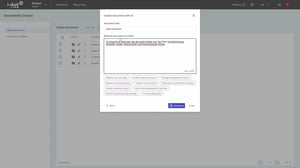
Create document templates with AI – with the i-doit AI Documents Creator Add-on

Professional documents directly from your CMDB data – without building templates by hand. Save time while ensuring a clear, consistent structure.

Create document templates with AI

The i-doit AI Documents Creator Add-on extends the i-doit Documents Add-on with AI. Instead of building templates manually, you describe what you need in chat, and the AI creates or adjusts the template for you. Simply define the document structure once and reuse the template whenever needed. Content is pulled live from your CMDB and transformed into a structured, professional document in your corporate design. Use the built-in AI, or optionally connect your own LLM.

Key benefits at a glance:

  • Automatically generate documents from live CMDB data
  • Templates created and adjusted by AI via chat, with no manual building
  • Consistent and professional document structure
  • Significantly faster than traditional document creation
  • Reusable templates for recurring documents
ai-use-case-screenshot-documents-ai-use-case-screenshot-dokumente-erstellen
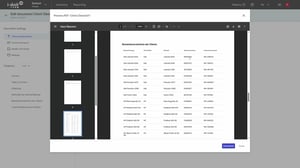
Significant time savings when creating protocols, reports and documentation – at the click of a button

Use your templates to generate complete documents directly from your CMDB at any time. Simply select the desired object or relevant data and automatically create a structured document. Content is accurately transferred, cleanly formatted, and instantly ready to use.

Typical use cases:

  • Hardware handover protocols for devices and workstations
  • System and infrastructure documentation, including manuals
  • Disaster recovery plans
  • Asset reports for audits or internal reviews
  • Compliance and certification records (e.g., ISO 27001)
  • Contract overviews and inventory lists for departments or locations
ai-use-case-screenshot-documents-ai-use-case-screenshot-dokument-erstellt
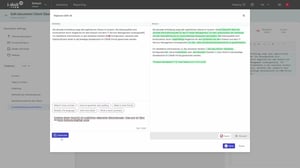
Refine and expand documents with AI

With the i-doit AI Documents Creator Add-on, you don’t just generate documents automatically – you also improve them using AI. Content can be optimized, expanded, or refined in terms of language, based directly on your existing CMDB data. This results not only in faster document creation but also in higher-quality output.

Key benefits at a glance:

  • Automatically create and improve content
  • Optimize and expand existing sections using AI
  • Consistent, clear, and professional wording
  • Direct use of your live CMDB data
  • Significantly less manual effort and rework
ai-use-case-screenshot-documents-ai-use-case-screenshot-Abshcnitt-verbessern

FAQs zu AI Use case

Ihre Vorteile auf einen Blick

Für welche i-doit Versionen gibt es das Add-on? Das Add-on gibt es sowohl für i-doit (On-Premises & Cloud) als auch i-doit up.
Welche KI-Systeme werden unterstützt?

 Es können alle KI-Systeme angebunden werden, die über das MCP-Protokoll kommunizieren. Die Integration ist somit flexibel und nicht auf einzelne Anbieter beschränkt. 

Wie kann ich das Add-on testen?

 Wenn Sie das Add-on selbst testen möchten, wenden Sie sich bitte direkt an den Vertrieb für eine Testlizenz. 

Kann ich alle API-Funktionalitäten nutzen?

 Nein. Der aktuelle Funktionsumfang ist auf die in der Weboberfläche verfügbaren Standardfunktionen beschränkt. Erweiterte oder individuelle API-Funktionen sind derzeit nicht Bestandteil der Integration. 

Funktioniert das Add-on nur On-Premises oder auch in der Cloud?

 Ja. Die Lösung kann sowohl in Cloud-Umgebungen als auch in On-Premises-Infrastrukturen eingesetzt werden. 

Können Sie mir das Add-on vorstellen?

 Für eine Live-Demo wenden Sie sich bitte direkt an den Vertrieb.

Wie kann ich eine On Premises Version testen?

Nachdem Sie auf einen der Button auf dieser Seite geklickt haben, können Sie auf den folgenden Seiten auswählen, welche Art der Installation Sie herunterladen und testen möchten. Zur Verfügung stehen die folgenden Downloads.

Virtuelle Maschine:
Die Virtuelle Maschine enthält eine vollständige i-doit Installation auf einem Debian GNU/Linux 12.

Windows Installer:
Der Windows Installer stellt auf Microsoft-Serversystemen eine vollständige i-doit Umgebung bereit. Die Installation erfolgt mit einem Klick.

Automatische Installation:
Ein interaktives Bash-Script führt Sie durch alle Konfigurationen auf einem Linux-System und installiert die benötigen Komponenten

Manuelle Installation:
Webserver, Datenbank, PHP und i-doit werden manuell installiert und konfiguriert. Auch Backups und Cronjobs müssen selbständig eingerichtet werden.

Wie kann ich eine Cloud Version testen?

Nachdem Sie auf einen der Button auf dieser Seite geklickt haben, können Sie auf den folgenden Seiten auswählen, welche Art der Testinstanz Sie testen möchten. Wenn Sie sich für die Cloud entscheiden, erstellen wir für Sie automatisiert eine virtuelle Umgebung

Book your personal live demo

Our i-doit team will be happy to take the time to advise you personally on your application.