Skip to content
ai-use-cases-brain-chip-artificial-intelligence-concept

Query, modify, and create data with AI integration

Use your own chat application to access your data with the help of AI


Book a demo

Discover what the i-doit ChatCMDB Add-on can do

With the i-doit ChatCMDB Add-on, you can use AI integration to find, update, or create information in the CMDB.

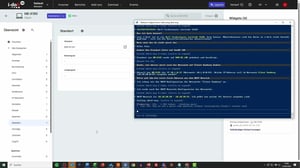
Query and search – information directly from the CMDB

Need to know which client is assigned to a specific user?
Instead of navigating through multiple categories, simply ask a question:

“Which client does Max Mustermann use?”

Your request is processed instantly, delivering the right information directly from your documentation.


Benefits:

  • No time-consuming searching through data structures
  • No specialist knowledge of i-doit / i-doit up required
  • Results available in seconds
  • Ideal for support, administration, and quick information requests


ai-use-case-screenshot-Geraeteinformationen-finden
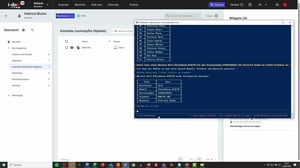
Create and update – everything directly via chat

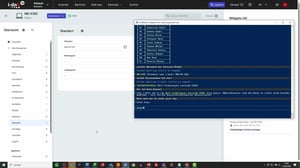
With ChatCMDB, you can make changes and create new entries without any detours. Instead of clicking through forms and menus, you simply describe what should happen. Whether you need to update a device’s location, modify user data, or create and link new hardware, everything is executed directly in your documentation. Even multiple devices can be efficiently created via copy and paste and structured automatically.

Key benefits at a glance:

  • Make changes and create new entries without navigation
  • Automatically and correctly link devices (users, locations, etc.)
  • Significantly fewer errors thanks to clear inputs
  • Fast processing even for multiple devices (e.g., via lists)
  • Consistent and clean data structure in your CMDB
ai-use-case-screenshot-Geraeteinformationen-aendern
Benefits of the i-doit ChatCMDB Add-on

With the i-doit ChatCMDB Add-on, you can access your IT documentation directly via chat and complete typical tasks much faster. You eliminate unnecessary clicks, reduce potential sources of error, and always maintain full visibility over your data. Whether querying, updating, or creating new entries – you work more efficiently, in a more structured way, and without detours.

Usage is flexible: the i-doit ChatCMDB Add-on can also be used in read-only mode when no changes are permitted. In addition, you can connect your preferred AI independently, such as ChatGPT or Claude, giving you full control over your environment.


Key benefits at a glance:

  • Direct access to data without navigation
  • Significantly faster day-to-day operations
  • Fewer errors thanks to clear inputs
  • No specialist knowledge of i-doit required
  • Flexible use with your own AI integration (e.g. ChatGPT or Claude)
ai-use-case-screenshot-Geraete-anlegen

FAQs about AI use cases

Your benefits at a glance

Which AI systems are supported?

Any AI system that communicates via the MCP protocol can be integrated. This makes the integration highly flexible and not limited to specific providers.

How can I test the add-on?

If you’d like to try the add-on yourself, please contact our sales team to request a trial license.

Can I use all API functionalities?

No. The current functionality is limited to the standard features available in the web interface. Advanced or custom API functions are currently not part of the integration.
Does the add-on only work on-premises or also in the cloud?

Yes. The solution can be used both in cloud environments and on-premises infrastructures.

Can you give me an overview of the add-on?

For a live demo, please contact our sales team directly.

contact-cta-bg-light

Book your personal live demo

Our i-doit team will be happy to take the time to advise you personally on your application.