

i-doit
CMDB, ITSM, ITIL, IT-Docu







Use the i-doit AI add-ons to increase your level of automation with the help of AI!


i-doit / Paid
Your price advantage: get three add-ons for the price of two!
i-doit MCP Add-on
i-doit Documents Add-on
i-doit AI Documents Creator Add-on
Automatically import data from PDFs, tables and CSV
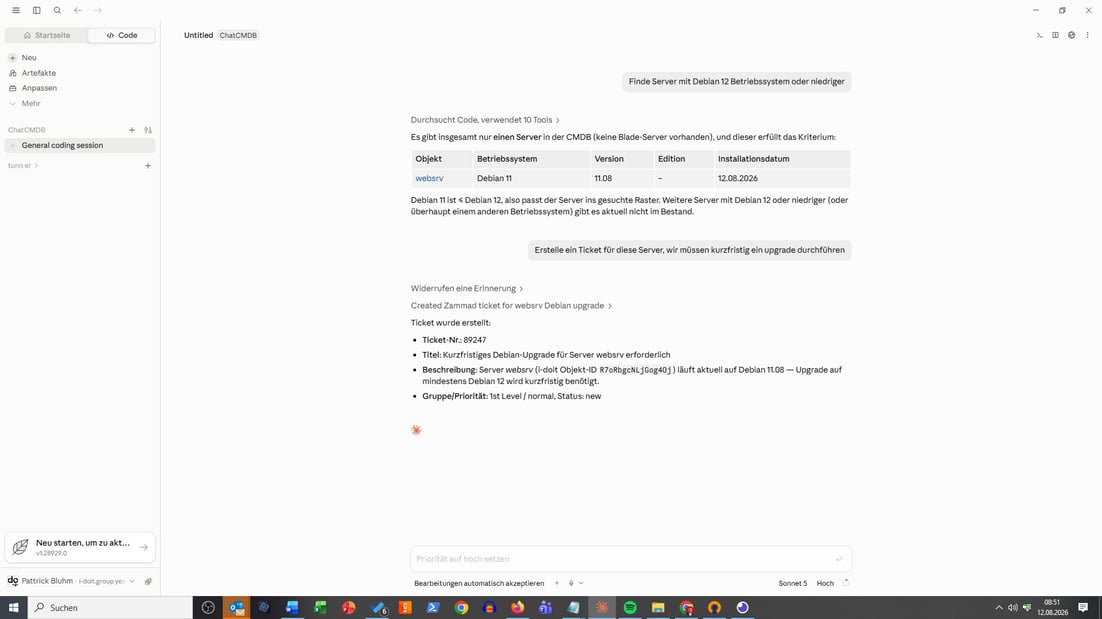
Query (optional read-only), create and change CMDB data via chat
Automatically create documentation, reports and visualizations
Run complex workflows via a chat command
Connect external AI agents via MCP
You get 3 add-ons for the price of 2. If you already use the i-doit Documents Add-on, the bundle price is reduced to the price of a single add-on.
Support for this add-on is included in i-doit Basic and Advanced Support
In-app installation via the i-doit Add-on & Subscription Center.
With the AI Bundle, you take i-doit to the next level with three add-ons that simplify your day-to-day work with i-doit:”the i-doit MCP Add-on brings chat-based access to your CMDB, the i-doit Documents Add-on generates documents from live data, and the i-doit AI Documents Creator creates templates and content automatically with AI. This removes most of your manual data maintenance.
You work directly in your familiar chat application – with no deep i-doit expertise required. Via the MCP protocol, you connect your own AI, for example ChatGPT, Llama or Claude. The bundle runs in the cloud and on-premises and uses the data you already maintain in i-doit.
Connect your LLM (e.g. ChatGPT, Llama or Claude) to i-doit. Query, change and create large volumes of data quickly and easily, import data from PDFs and tables, or build recurring workflows and reports.
Your data. Your control.
Your CMDB holds sensitive information about your entire IT. That's why the i-doit MCP Add-on always keeps you in full control of which data flows where and what the AI is allowed to do with it.
Where is data processed?
Data is processed in the AI system you connect yourself. So you decide which provider or model gets access to your CMDB data.
Can you use your own AI infrastructure?
Yes. The i-doit MCP Add-on supports all AI systems that communicate via the MCP protocol — whether ChatGPT, Claude or your own model. You are not tied to any provider.
Which permissions apply?
The AI only accesses the data it has been granted. You define which information is visible to the AI. There is a dedicated technical AI user whose permissions apply.
Can the AI change data or only read it?
You decide. You specify whether the AI has read-only access or may also create and change data.
Is fully local use possible?
Yes. Run i-doit on-premises and connect a locally hosted model, and your data never leaves your company at any point.
An extension for the i-doit AI Documents Add-on: use our built-in or your own AI to create and adjust templates for protocols, reports, manuals or documentation by chat. No LLM of your own required, but can be connected optionally.
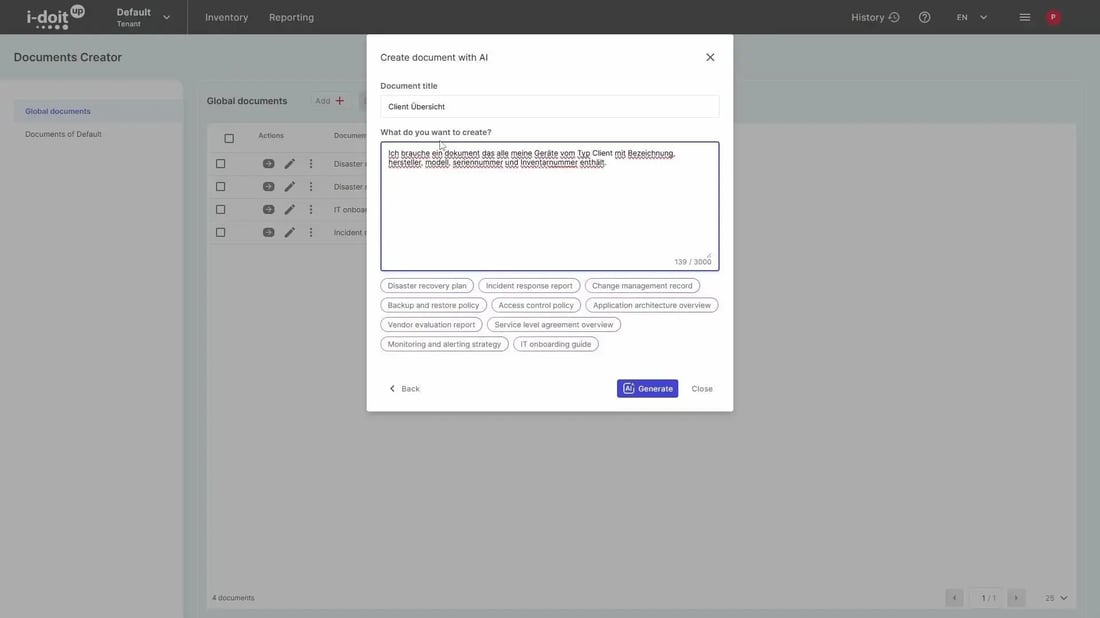
Create professional IT documents with a WYSIWYG editor, automatically filled with current CMDB data.
From hardware handover protocols to disaster recovery plans, build documents in your corporate design — perfect for teams that need consistent, always-current IT documentation with less manual effort.


Recognize data from PDFs automatically and transfer it straight into i-doit — no manual retyping.

Upload or paste a file and briefly describe what should be created — the AI adds devices, users and locations, with no field mapping.

Protocols, manuals and documentation automatically from live CMDB data — defined once as a template, reusable any time.

Ask questions in natural language (e.g. "Which client does Max Mustermann use?") and get the answer right away — no click paths.

Create, change and automatically link locations, users and hardware correctly — several devices at once, too.

Define recurring processes such as offboarding once and start them in a single step via a chat command — with no forgotten sub-steps.

Build reports from i-doit and visualize data — for audits, compliance evidence (e.g. ISO 27001) and internal reviews.

Give AI agents (e.g. ChatGPT or Claude) real-time read access to your CMDB via the MCP protocol — e.g. "Which systems are affected if this server fails?"
 2.000+ customers
 No payment details required
 Support included
 Full range of functions
 EU GDPR compliant
Create powerful automations without programming knowledge, simply start them on a schedule or manually at the touch of a button.
Easily create forms that you can make available to users for simplified data entry. Example: Allow users to document hardware or goods themselves.
Add-on for powerful data analysis. Calculate service costs, check the data quality of the CMDB and carry out failure simulations.
Automate the operation of your data center with the latest data from the CMDB. Events trigger and control further processes.
Get 4 powerful add-ons for the price of 2! Flows, Documents, Analysis and Forms.
The maintenance add-on supports the planning, execution and documentation of maintenance and inspections. Maintenance intervals, dates and responsibilities are managed centrally and linked directly to the respective devices, installations or systems.
Set up an information security management system with risk analysis and management in accordance with ISO 27001.
Integrate the Checkmk2 monitoring system into i-doit. This supports comparisons between TARGET and ACTUAL from CMDB and monitoring.
Store buttons with your own triggers and start IT processes directly from i-doit - e.g. the automatic deployment of a virtual machine.
With this add-on, you can create an information security management system (ISMS) in accordance with the BSI's IT baseline protection methodology.