i-doit
CMDB, ITSM, ITIL, IT-Docu







Use the i-doit AI add-ons to increase your level of automation with the help of AI!


Server documentation involves recording and storing important information about a company's server infrastructure. This includes details such as hardware, installed software, network settings and other technical data. The documentation can contain information about application settings, databases, operating system versions and security configurations.
It can be created in various formats such as text files, tables or special documentation tools such as i-doit. The goal is always the same: to better understand the system and make maintenance and troubleshooting more efficient.
Well-documented servers are crucial for efficient operation. It enables administrators to respond quickly to problems, maintain the system and share knowledge within the IT department. Without such documentation, troubleshooting and maintenance become much more difficult and time-consuming. Thorough and regular server documentation is an essential part of a sound IT strategy.
Server documentation can present a number of challenges. These can affect the quality of documentation and negatively impact its benefits for IT management.
Incomplete documentation
One of the most common problems is the lack of complete information. This can happen when certain aspects of the servers are not documented. Irregular updating of documentation can lead to problems if changes are not noted in a timely manner. Incomplete documentation can also make troubleshooting and maintenance more difficult.
Unclear or complicated documentation
Documentation that is not clear and easy to understand can be just as problematic as no documentation at all. If the information is not presented clearly and precisely, this can lead to misunderstandings and errors. This has a negative impact on server performance and security.
Lack of standardization
Without a standardized process for documentation, inconsistencies arise. The search for specific information is made more difficult and the efficiency of system administration is impaired.
Time and resources
Creating and maintaining comprehensive server documentation can be time-consuming and require significant resources. In many cases, documentation can be seen as a secondary task that takes a back seat to more immediate technical tasks.
Data security
Server documentation often involves the collection of sensitive information. If this information is not properly protected, it is exposed to a potential security risk.
Effective server documentation management helps to optimize server performance. It helps to simplify system administration and increase stability and security.
i-doit is a powerful and flexible software for IT documentation and a Configuration Management Database (CMDB). The solution offers a wide range of functions that help to create complete server documentation.
Ten important functions and their specific added value for the IT department:
CMDB
i-doit is a Configuration Management Database. Such a system allows a complete and structured recording of all IT assets and - above all - their relationships and dependencies with each other. This makes IT management easier, as the CMDB provides a clear overview of the entire IT infrastructure.
Automated data collection
With this function, i-doit automatically records information about IT assets. This significantly reduces the time you spend on documentation.
Documentation of changes
Every change to an IT asset is automatically documented. This history of changes supports you in change management and helps you with troubleshooting and forensics.
Logical and physical infrastructure documentation
With i-doit you can document the physical and logical IT infrastructure. This enables a complete representation of the IT environment and supports planning and maintenance.
ITIL conformity
i-doit supports the ITIL best practice frameworks and makes it easier for you to comply with industry standards. This leads to an improvement in service quality.
Customizable reports
With i-doit, you can create customizable reports that summarize individual information about the IT environment. This supports you in decision-making and compliance audits.
Customizability
Define individual object types and categories in i-doit. This flexibility allows you to adapt the software to your specific needs.
Interfaces and integrations
You can connect third-party systems to i-doit via a variety of interfaces and integrate the system into existing system landscapes. They improve the flow of information and optimize the efficiency of IT processes.
Role and authorization system
The powerful authorization system allows you to control access to data in i-doit very precisely. You improve data security and at the same time support team collaboration.
Lifecycle management
With i-doit, you can manage the entire lifecycle of an IT asset. This supports strategic asset management and enables you to better plan and control IT resources.
Overall, i-doit enables comprehensive, standardized and automated documentation of your servers. You reduce the time required, improve the quality of information and support efficient and secure IT management.
i-doit offers you various options for documenting servers. You can manually record detailed information such as hardware configuration, installed software, network settings and other technical details. In addition, i-doit works perfectly with various automatic network discovery tools.
Automatically collect information about all devices in the network. Or import data from external sources such as Excel spreadsheets using the import function. This versatility makes documentation easier and enables comprehensive and efficient management of the entire server infrastructure. We have summarized the most important functions for you here.
Old Excel lists are a good source for creating servers in i-doit. i-doit offers the "CSV import" function, with which the columns in the Excel table can be mapped with data fields in i-doit.
The server overview in Excel consists of various servers and virtual machines.
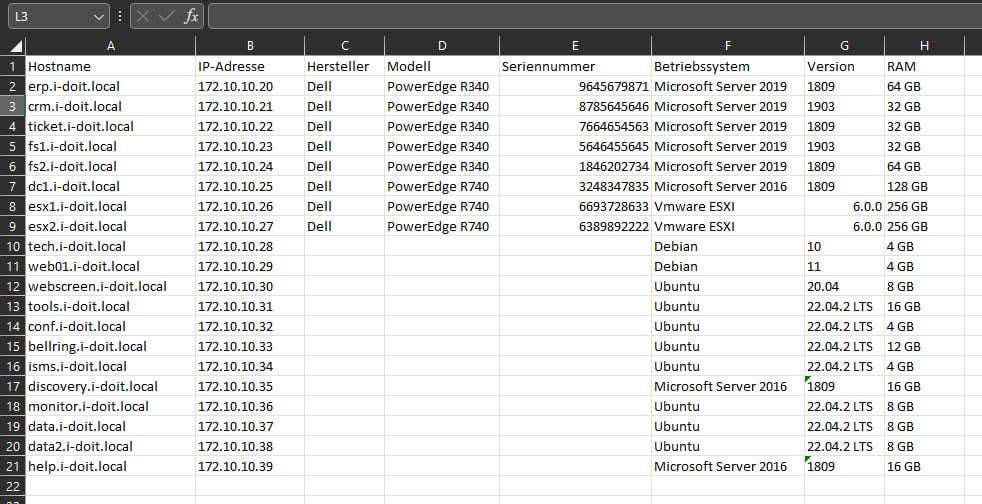 The original server list, which is still being expanded
In i-doit, a distinction is made out-of-the-box between physical and virtual servers. To tell i-doit which of the servers in the Excel table are physical and virtual servers, add three more columns to the list. In this example, the first column is labeled "Type", the second "Running on" and the third "Virtual machine".
Use the "Type" column to specify whether it is a physical / virtual server.
Use the "VM" column to specify whether it is a virtual machine.
The third column "Running on" is used to specify which virtual servers are operated on which ESX server.
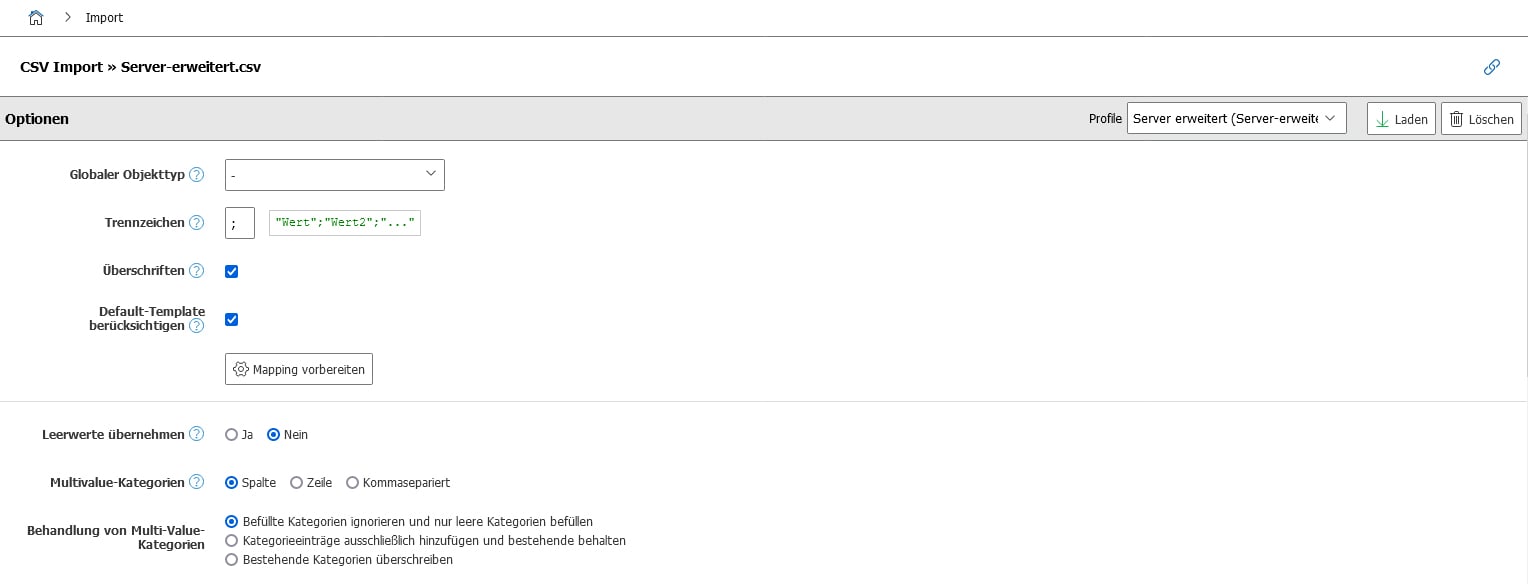
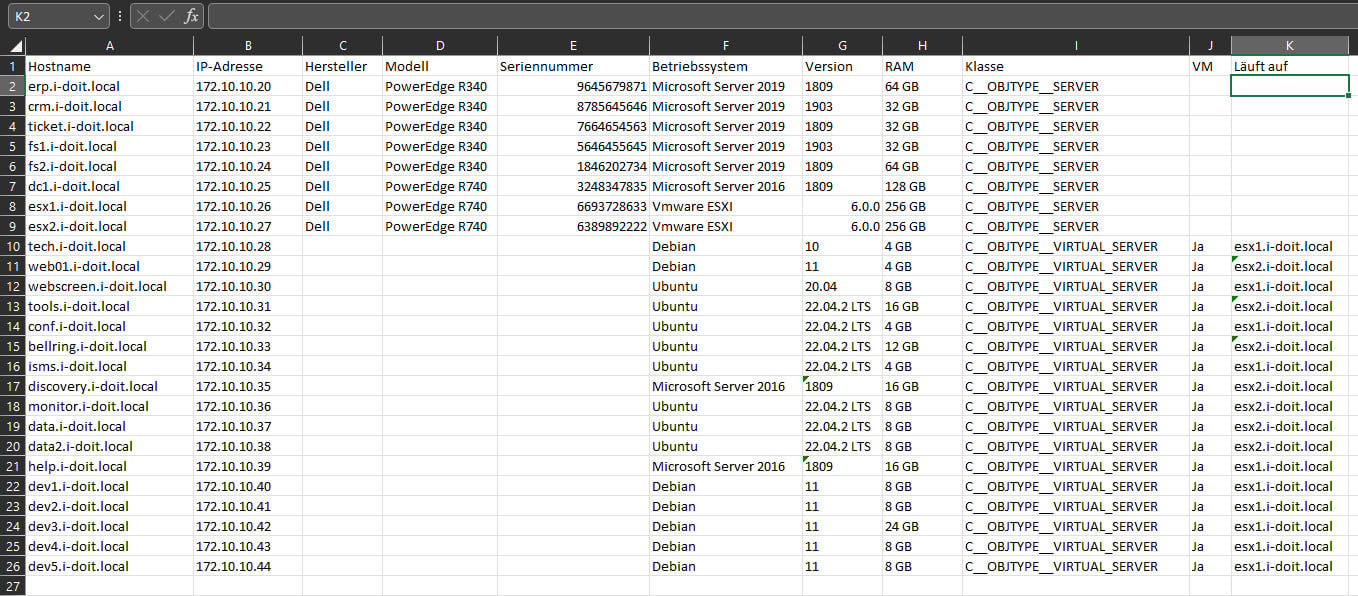 This Excel table can be easily imported into i-doit using the CSV import. Save the file as a CSV file and upload it to i-doit. The import takes place in four steps:
The Excel table already indicates which object types are generated for the respective rows ("Class" in the column). This information is therefore no longer required when configuring the import. Enter the separator used above. Excel usually uses a semicolon. To be on the safe side, check this by opening the CSV file with a text editor.
In the second step, you define which columns in the Excel table correspond to which fields in i-doit. For example, the "IP address" column corresponds to the "Host address" field. Proceed in the same way with the information on manufacturer, model, operating system and RAM. Also configure the assignment of the additional columns "Class", "VM" and "Running on".
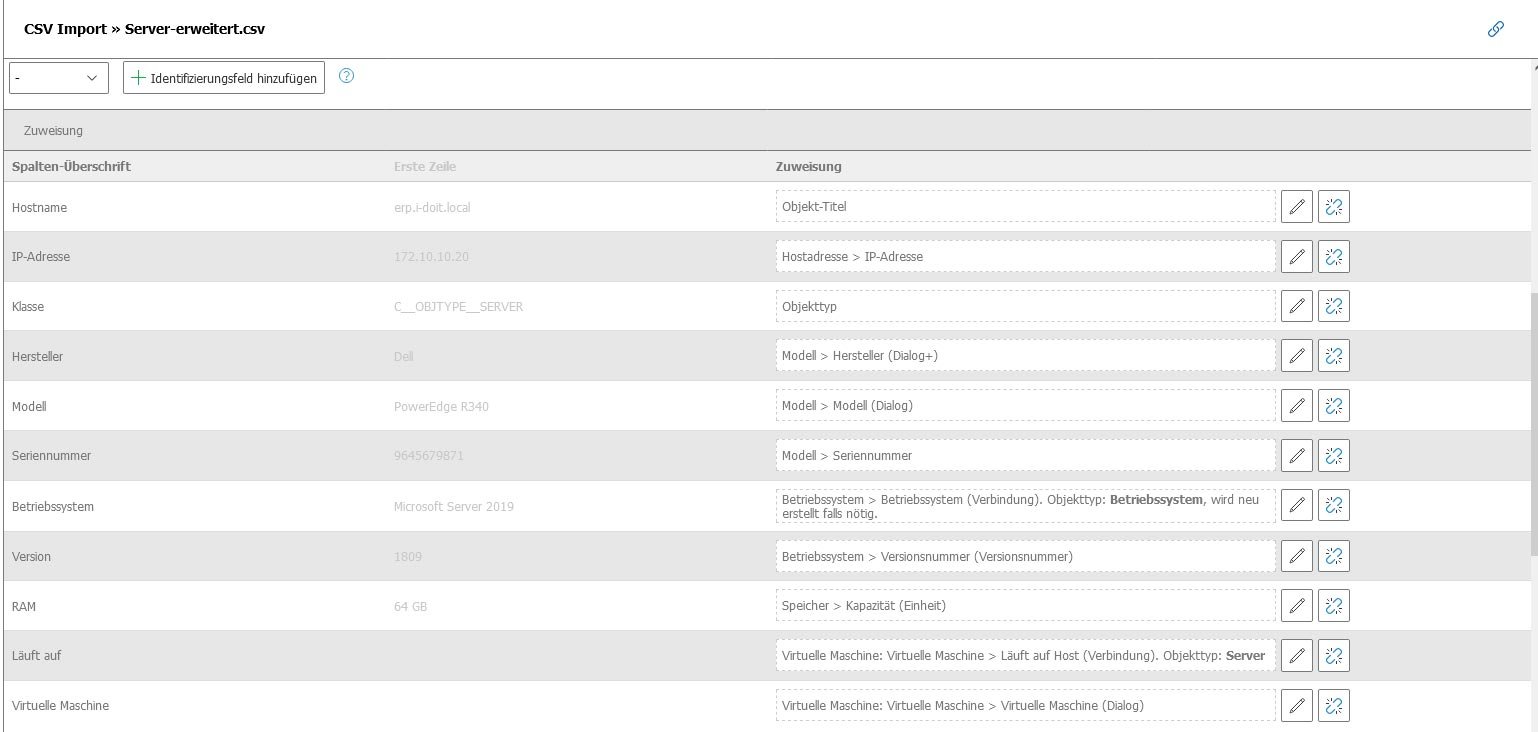
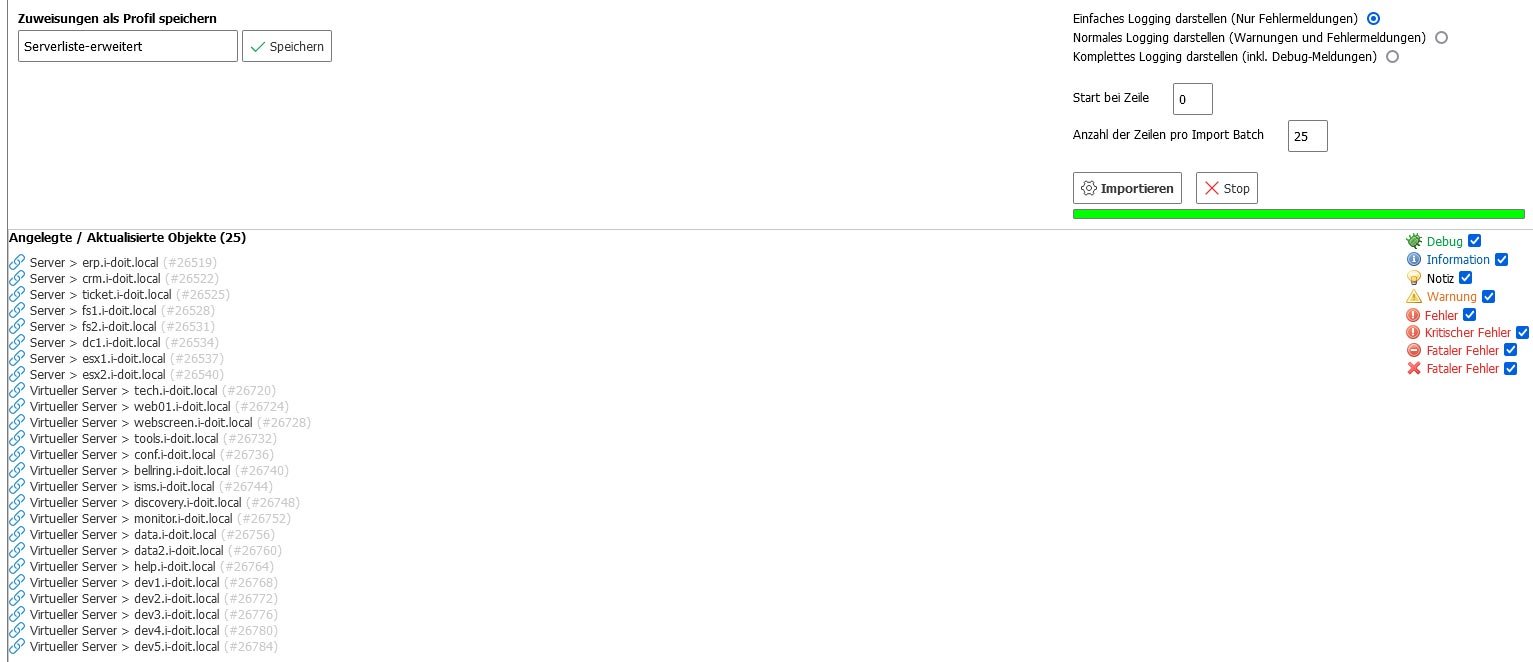
After completing the mapping, it is advisable to save this configuration as a new profile. This gives you direct access to the data field mappings when you import the Excel spreadsheet again. Save the configuration under "Save mappings as profile", e.g. as "Server list extended". Then start the import process. The transfer of the server list to i-doit only takes a few seconds with the recommended system requirements.
Call up the network overview after the import. Here you can see that the servers have been automatically assigned to the IP addresses. Click on the server name to see details such as the operating system or serial number.
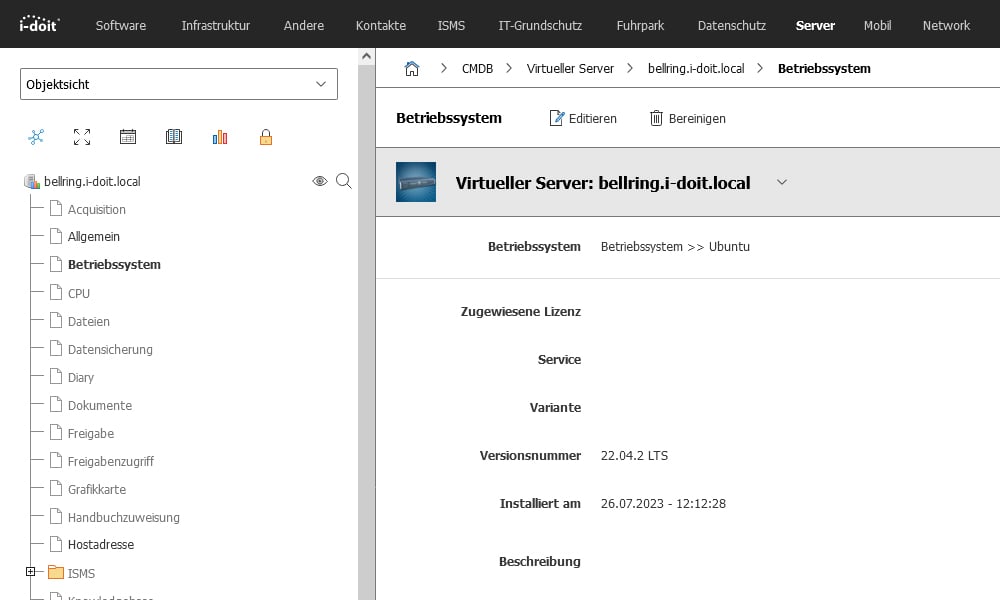
With the import function, all values from the columns of the Excel table are transferred in full. It is possible to add further details such as hardware information (CPU, hard disks, controller), installed applications, licenses, contracts, contact persons and locations. The operating system data was automatically transferred for all servers with their current version numbers.
The manufacturer, model and serial numbers have also been successfully integrated into the documentation. When you call up a virtual machine, you can now also see that it has been assigned to the host.
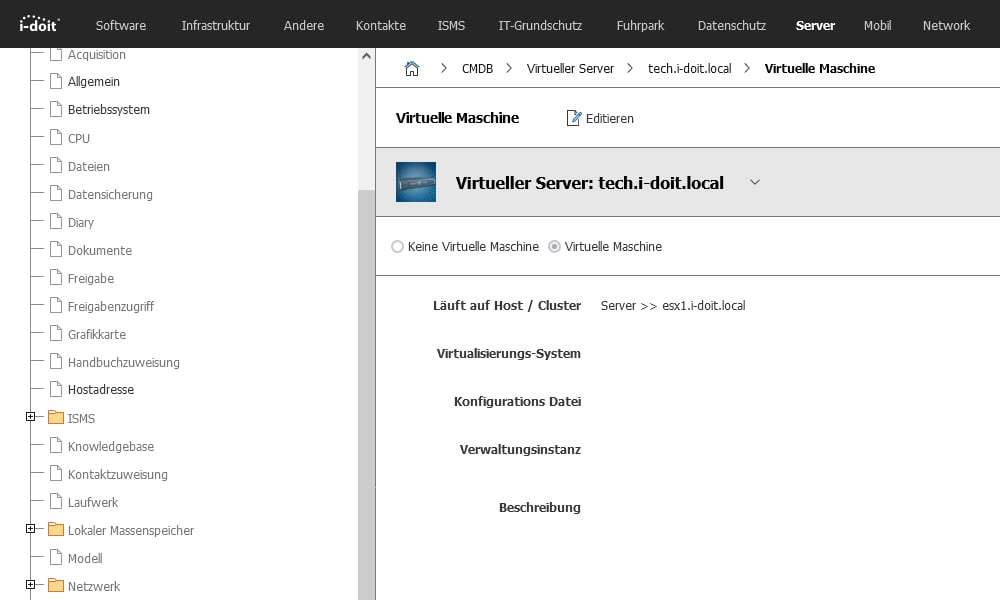
You also get an overview of which guest systems are running on a host.
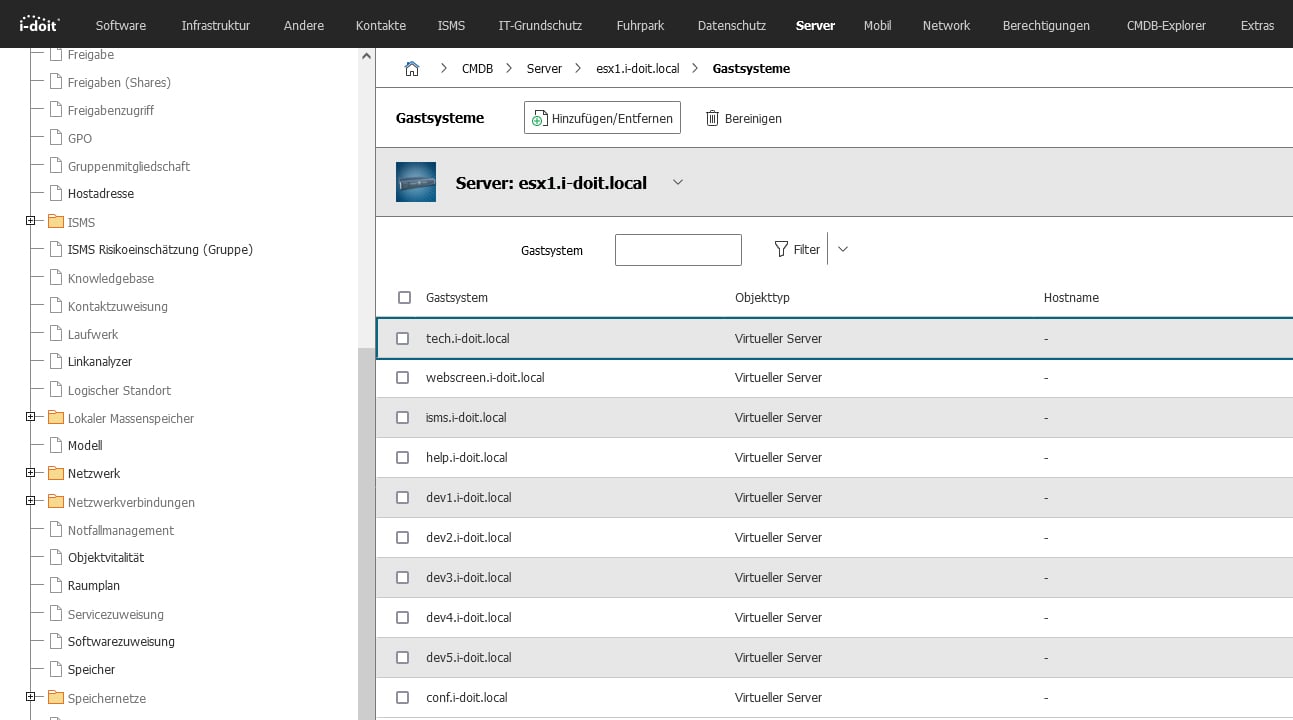
This function considerably simplifies the import of servers from Excel into i-doit and the entire documentation and management of the IT infrastructure.
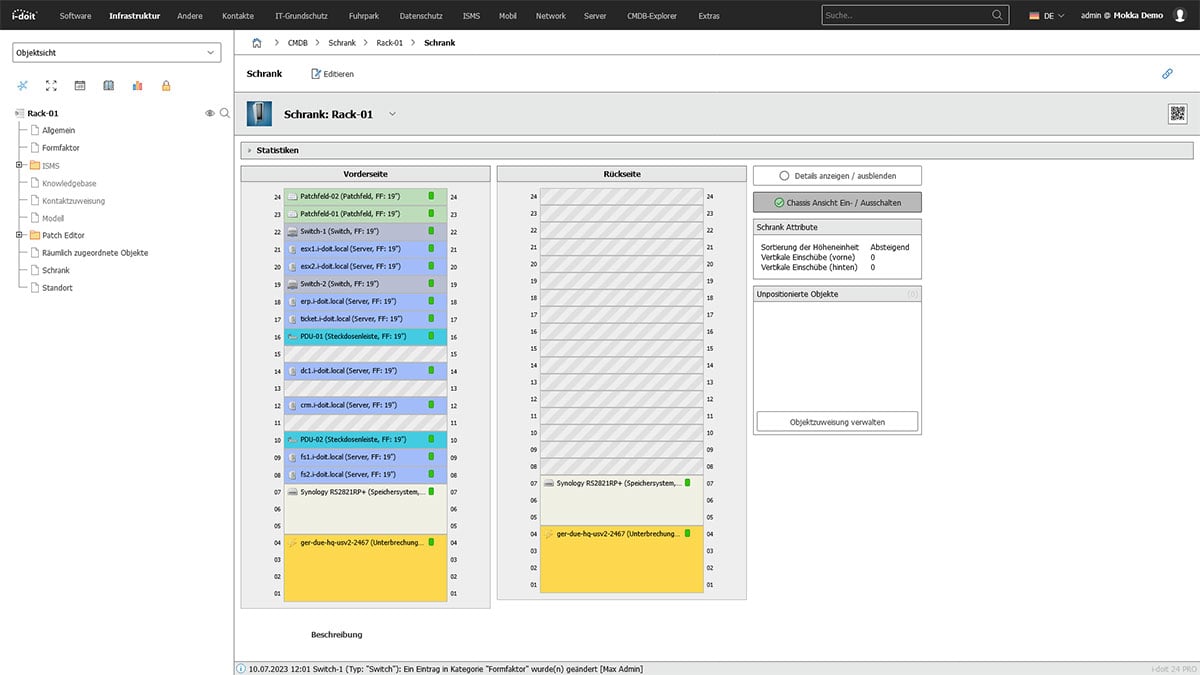
To get a better overview of the servers and their locations, create a server rack in the data center.
Create server cabinet
Select the predefined object type "Cabinet" for server cabinets from the menu on the left-hand side. First enter a name for the cabinet and then click on "Save". Now enter the form factor and the number of height units (HE). In this example, we select a classic 19" rack with 24 U.
Open visual overview
Open the visual overview in the "Rack" menu item in the left-hand navigation. The 24 height units are automatically used for the view.
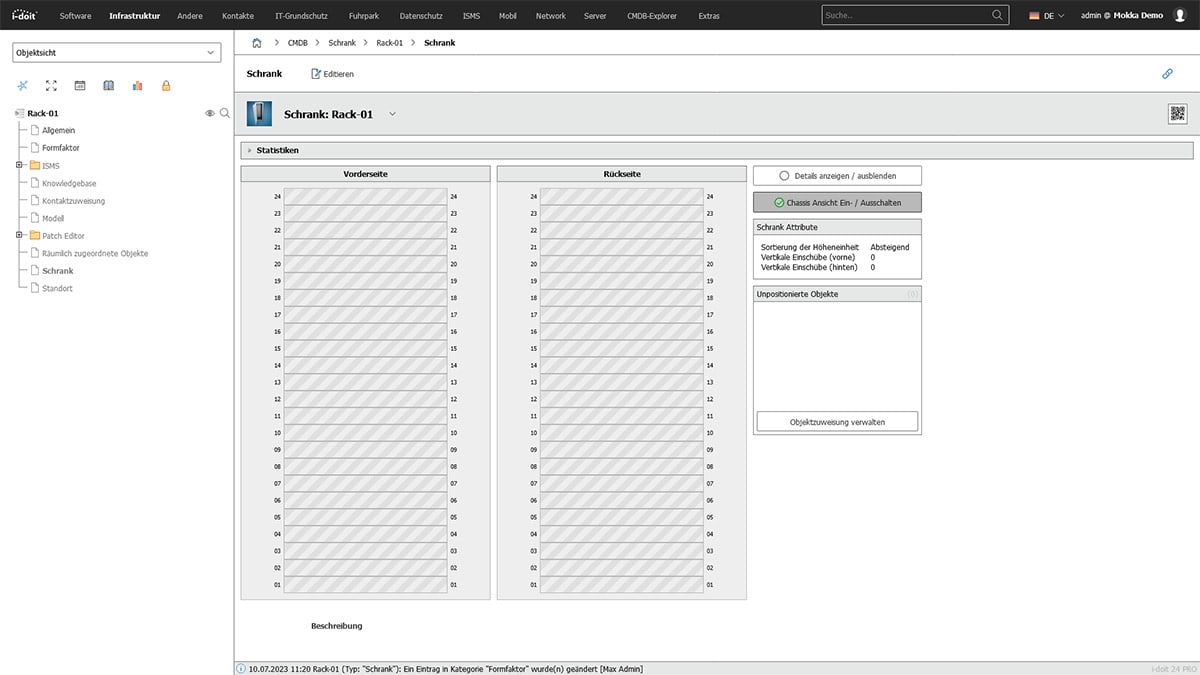
Assign servers
Now assign the servers to the server rack via the "Spatially assigned devices" category. Add the servers here.
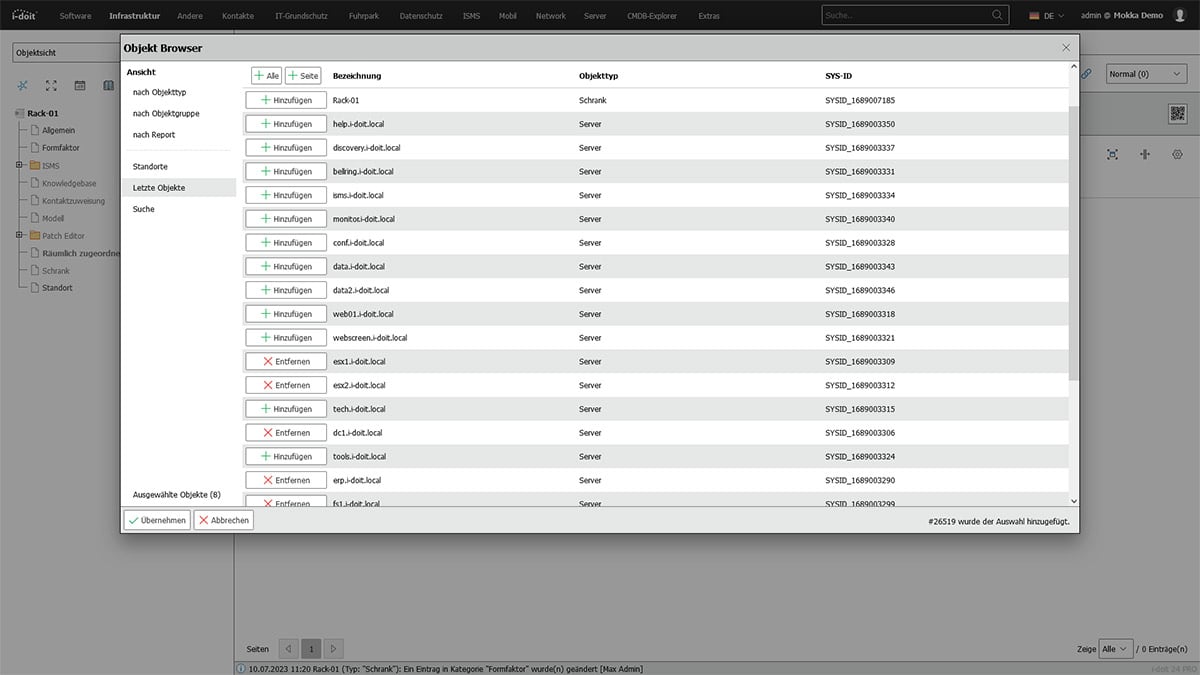
Specify the position in the rack
i-doit now knows the devices that are assigned to this rack. Now enter the exact position in the rack. Select a device and "install" it in the corresponding slot in the rack. Repeat this for all servers assigned to this rack.
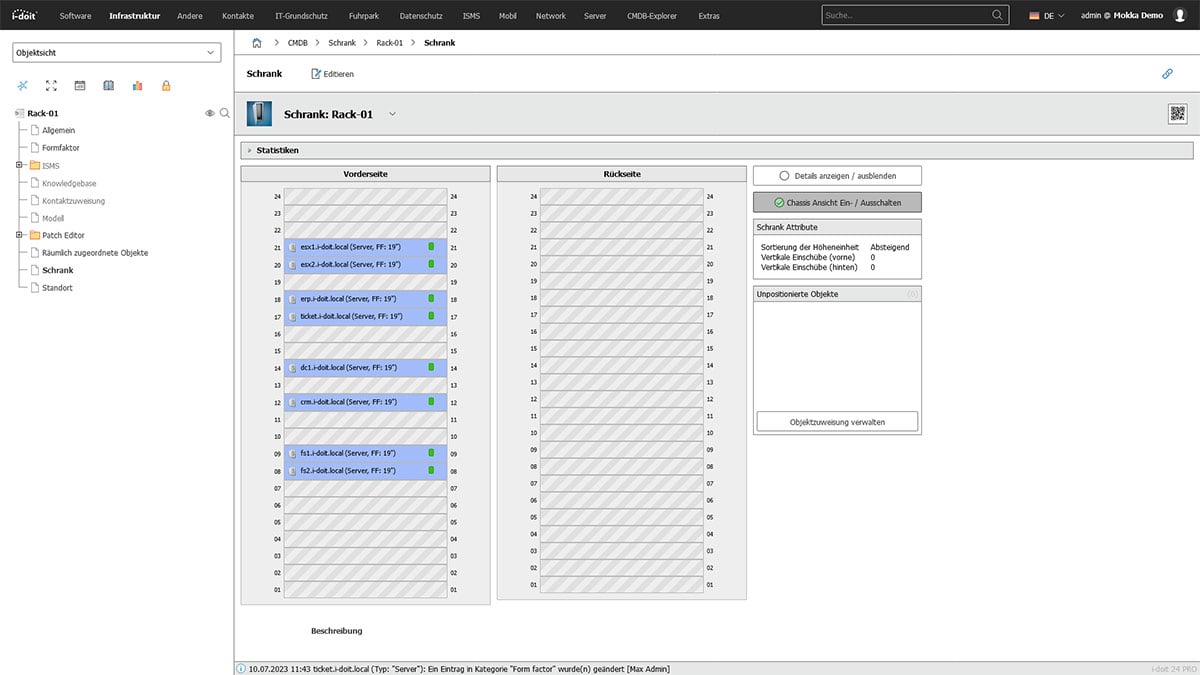
Add further components
Once all devices have been assigned to a slot, you have the option of adding UPS, patch panels and switches to the server rack.
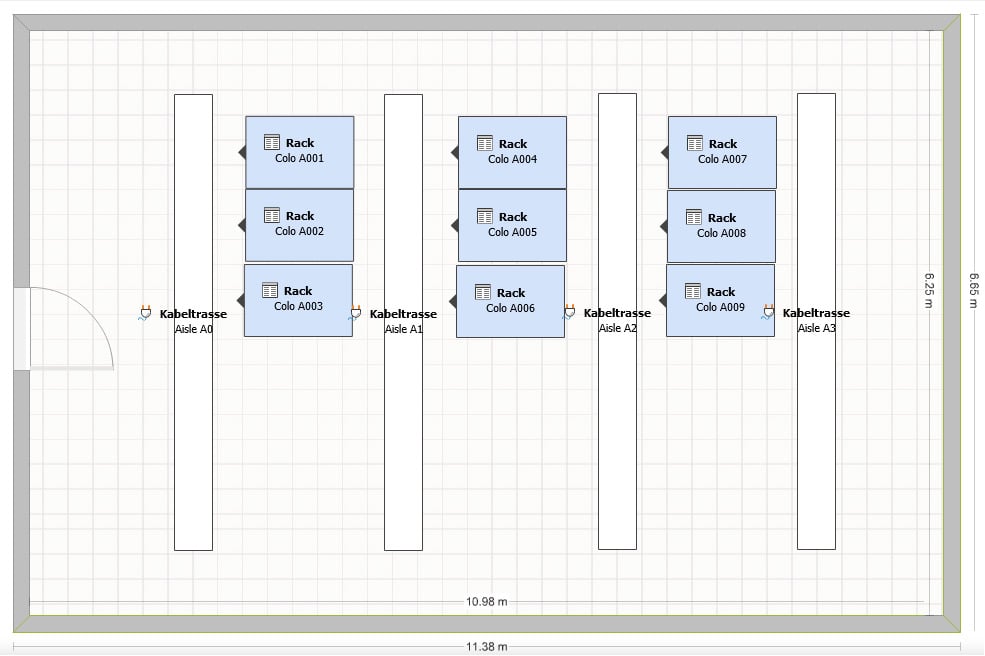
Room visualization for multiple cabinets or data centres
If you have several server racks (or an entire data center), we will create the free i-doit Floorplan add-on for you. With this add-on, you can create floor plans and visually arrange devices in them. This allows you to keep track of the locations of the cabinets and the devices they contain. This makes it easier to plan new components or changes to existing systems.
These steps allow you to manage your server infrastructure efficiently and maintain an overview. The clear assignment of devices and their location makes day-to-day work easier and enables smooth system maintenance and development.
Record and assign contracts
Additional service or maintenance contracts are often concluded for critical systems. With i-doit, you can record these contracts and assign them to the respective systems. You can determine which contracts have been concluded for a server both via the server view and via the documented contract. In principle, any type of contract can be recorded in addition to service and maintenance contracts.
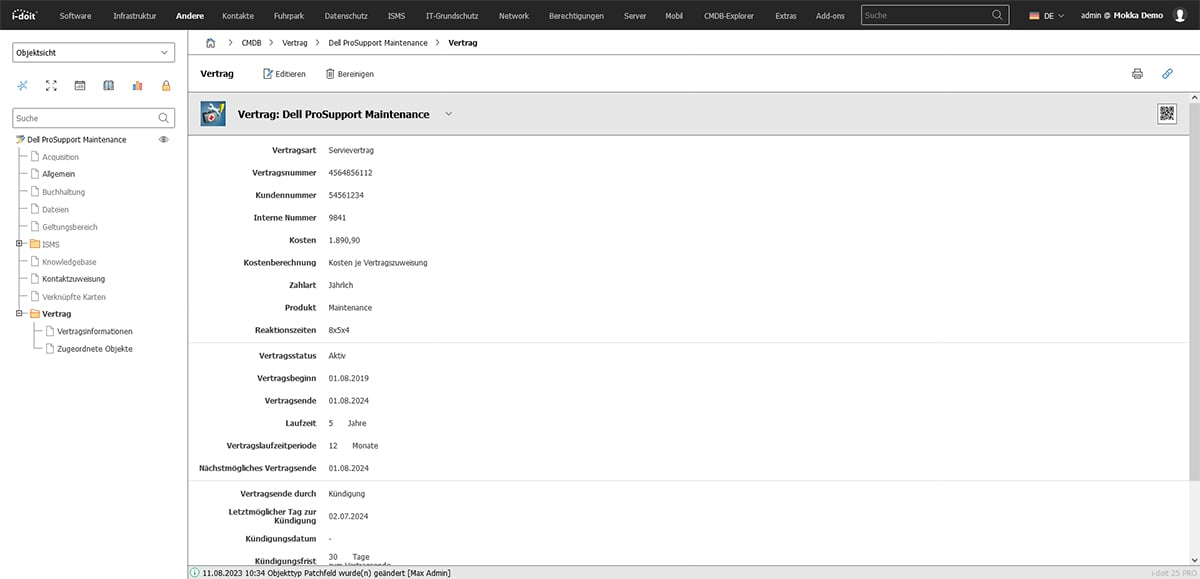 All contract information is recorded in i-doit and linked to existing systems.
Administrators, contacts and other important contacts
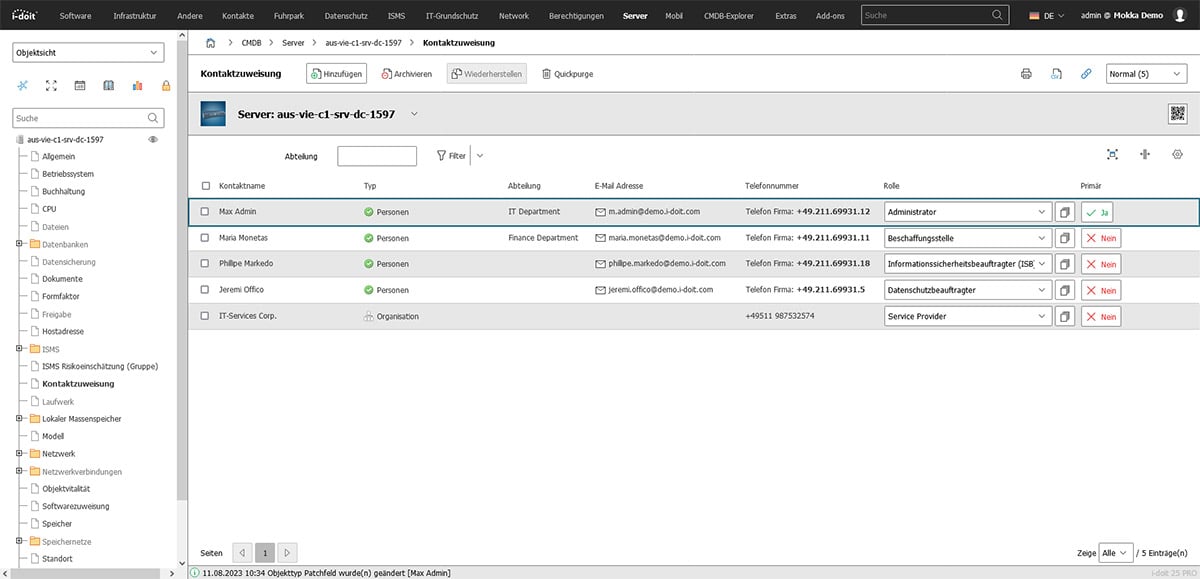
Various people, organizations and service providers are linked to their respective roles via contact assignment. This allows you to easily map who is responsible for a server, who is authorized to procure spare parts and which external organizations are responsible for maintenance.
Software, licenses and databases
Server documentation would not be complete without the assignment of software, licenses and databases. i-doit offers great functions for the documentation of
Client and server applications
system services
Licenses (single, volume and core-based license models)
Database management systems,
databases and tables.
You record all this information in i-doit and link it logically.
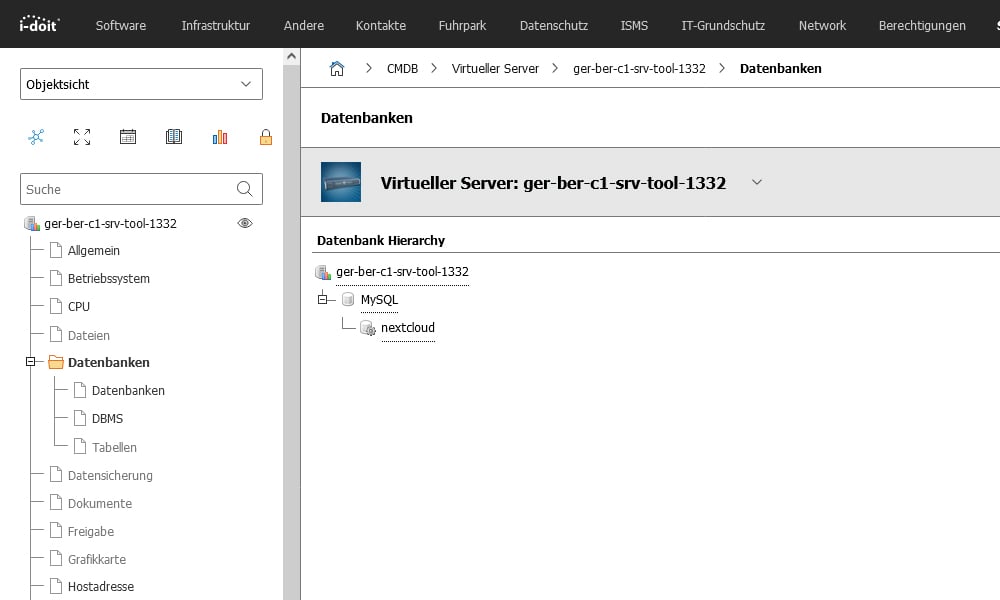 You map databases in servers and virtual servers.
In the license overview, the systems that use the respective licenses are displayed next to the license information.
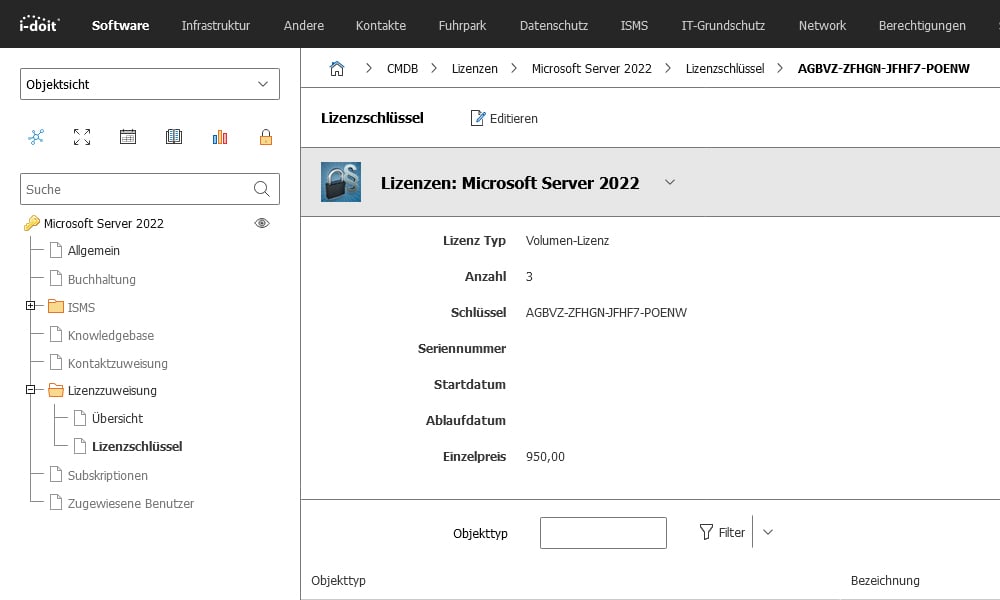 Documented Microsoft Server 2022 license
In the respective server, you can see which licenses are used on this system in the "Software assignment" and "Operating system" categories.
Logging of changes
All changes to a server system that you record in i-doit are automatically documented. If you add new memory or install new software, this is noted in the logbook. The addition of new contact persons or contracts to a server can also be tracked in this way. The logbook can be filtered according to changes made by users or interfaces. A time range can also be selected in order to narrow down a problem that has occurred.
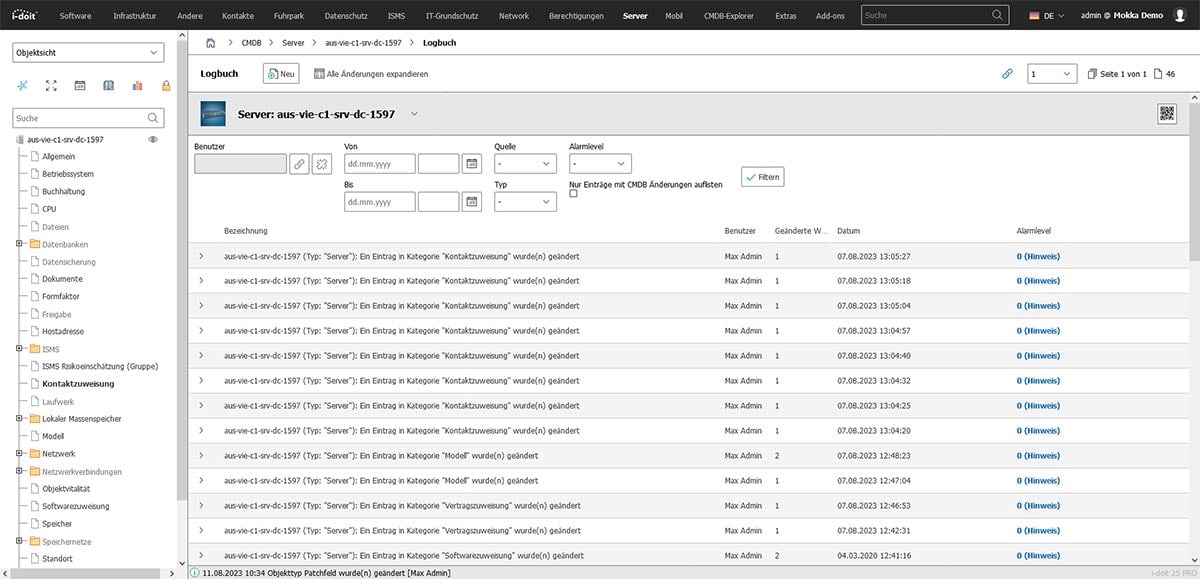
Define authorizations
Experience shows that the documentation of authorizations for software is often neglected. However, especially when many people have access to a system, it is important for IT staff to maintain an overview.
Security aspects
By documenting authorizations precisely, you can identify security gaps and close them at an early stage. You prevent unwanted access to sensitive software functions or data and protect the IT infrastructure from potential attacks. Especially when onboarding and offboarding employees, it is easy to forget to grant or withdraw authorizations in the hectic pace of everyday life.
Compliance
Many companies are subject to certain compliance guidelines and laws that stipulate the correct management of software licenses and access rights. By documenting authorizations, you can prove that you are complying with legal requirements and that software is properly licensed.
Efficient administration
Clear documentation of authorizations makes it easier to manage software within the company. It is easier to determine which users have access to which programs and functions. If necessary, you can adjust or revoke authorizations.
Knowledge management
Documenting software authorizations is also an important part of knowledge management. If employees have information about access rights, they can work faster and more efficiently with the relevant programs and answer support queries more quickly.
To document the authorizations for your applications, create a separate, user-defined category. This should be visible in all applications. As you usually document different authorizations for each application, this category is created as a multi-value category. This allows you to add multiple entries (authorizations) later.
In this simple example, you need four data fields:
The employee who receives the authorizations.
The linked security group.
The date on which the change was made to the security group.
A status indicating whether the assignment was granted or withdrawn.
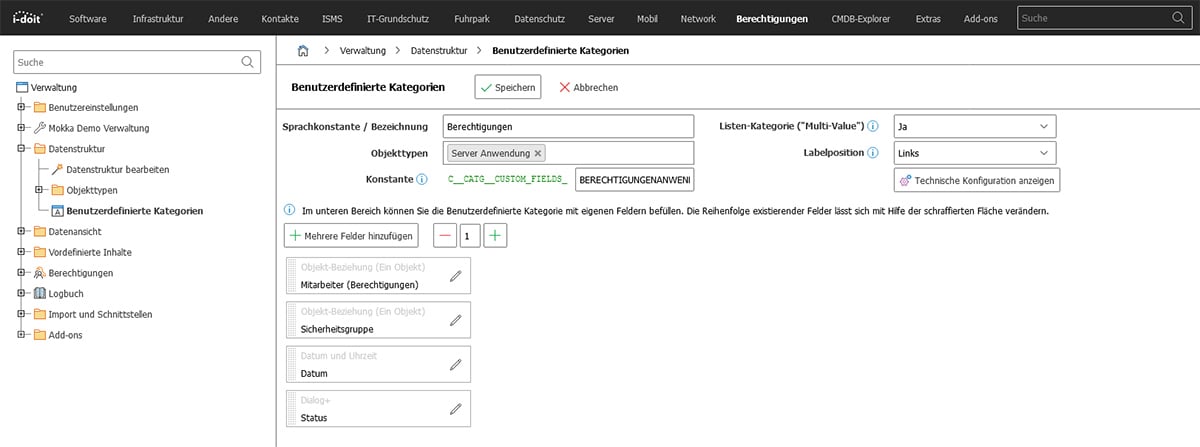
This newly created category now appears in every application and can be filled with information.
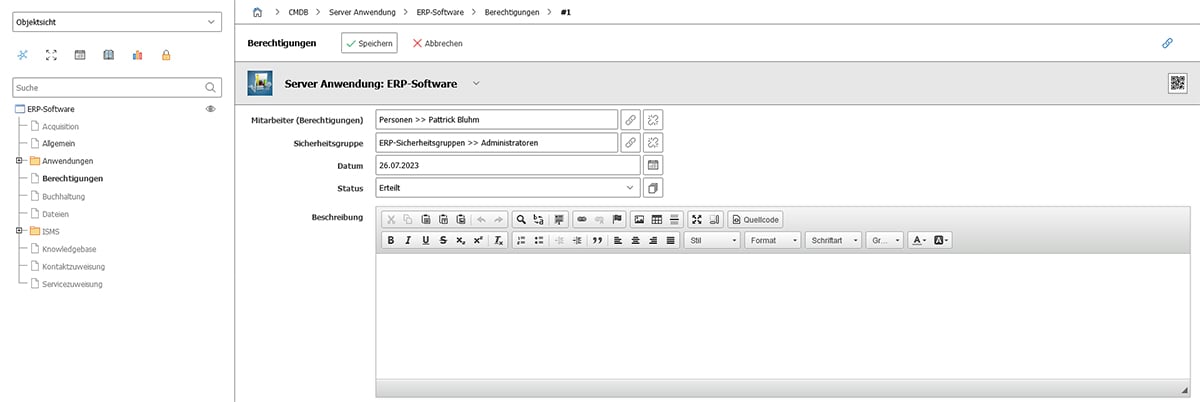
Each entry is listed separately in the category. The format of the entered data can be controlled by defining fields of different data types. In this example, object relationship, dialog, dialog (multiple selection) and date fields were used. A detailed overview of the possible field types can be found in our knowledgebase.
Once you have created the authorizations, you will receive a complete overview of all entries in the category.
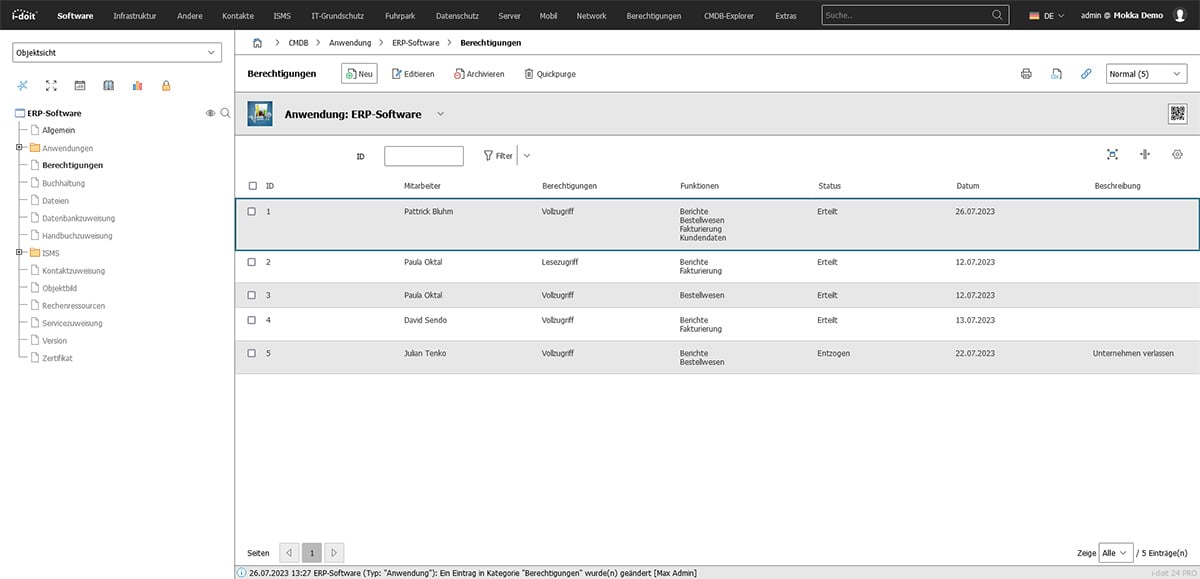
The assigned authorizations are not only visible in the ERP application. The linked employee now also has a category in which all authorizations are listed. This is particularly helpful when offboarding employees. When they leave the company, it becomes easier to actually revoke all authorizations and coordinate this.
You also have the option of using the security group to see which employees have which authorizations for which systems.
Network discovery - reduce effort and increase data quality
Many administrators laboriously document by hand which servers are present in the network and how they are connected to other components. This is very time-consuming, especially in large networks. A discovery solution can take over this task cost-effectively.
What are the advantages of a network discovery tool?
Automatic discovery
The software automatically scans the entire network and identifies the connected servers. There is no need to manually check each individual IP address.
Information collection
Discovery collects information from the detected servers, such as names, IP addresses and software versions. You receive a comprehensive picture of your network and server infrastructure.
Recognize relationships
Some solutions are able to find out how devices are connected to each other. This allows you to automatically determine which other devices are connected to a server. You get a clear idea of the network topology.
These automatic processes not only significantly reduce the amount of manual documentation required. Data quality is also noticeably improved, as transmission errors can occur with every manual change. With a discovery tool, you can also check the existing systems much more frequently and keep the database up to date.
Accuracy
A discovery solution collects the information directly from the devices. Human error is minimized. The data collected is generally accurate and reliable.
Consistency
Automatic collection and updating ensures that the information in the database is always up to date. Inconsistencies are avoided.
Completeness
Discovery collects comprehensive information on all devices. Important details are not forgotten. It also ensures that no devices in your network are overlooked.
Transparency
Accurate and consistent data gives you a clear overview of your network infrastructure. This enables better planning and decision-making.
An established discovery solution is JDisc. The tool was developed to collect information about the devices and networks in your IT infrastructure. It enables automatic discovery of computers, servers, routers, switches and more.
How does JDisc work?
Network scanning
JDisc performs a so-called "scanning" by searching the network for connected devices. It sends requests to IP addresses and checks which devices respond to them. Various protocols and methods such as ICMP, SNMP, SSH and WMI are used to retrieve information from the devices.
Information collection
When JDisc detects the connected devices, it collects information from these devices. This includes device names, IP addresses, MAC addresses, operating system information, installed software and much more. This collected data is stored in a database.
Recognition of relationships
JDisc also recognizes the relationships between devices. It determines which devices are connected to each other. This enables the software to recognize which other devices are connected to a server.
Scan and import
JDisc is an application for Windows operating systems that can be used on both clients and servers. You have the option of scanning entire networks, network areas or just individual hosts. You configure this accordingly in JDisc before you start the scan.
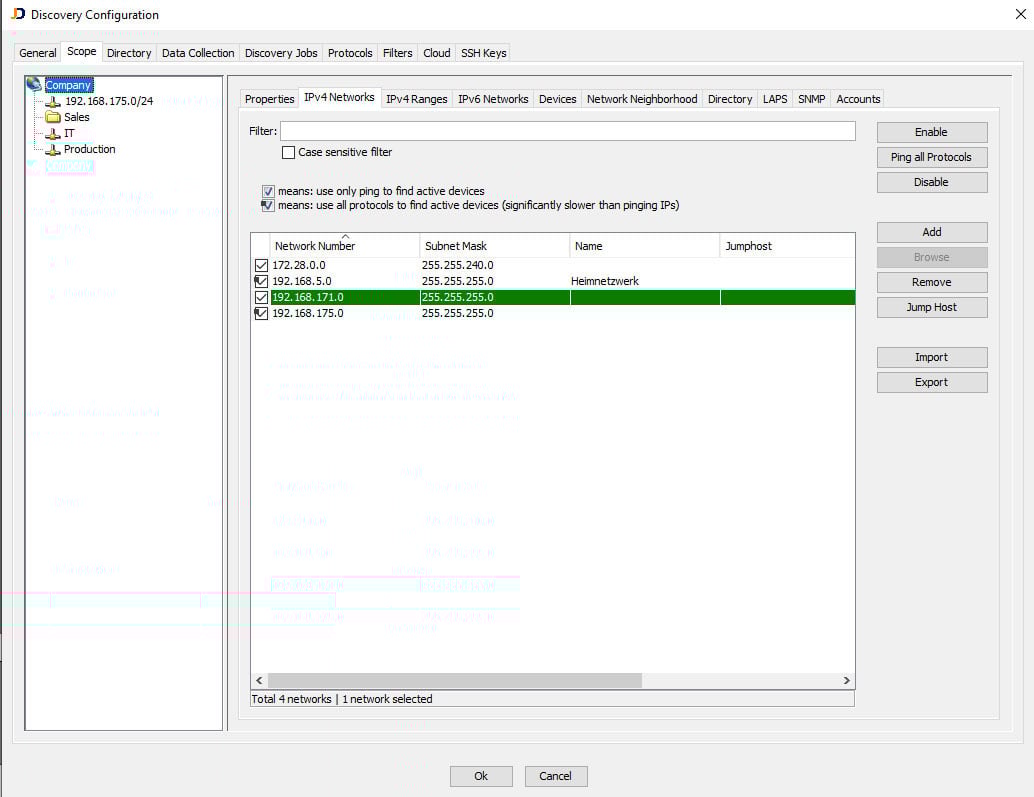
Important for data quality: Store access data for the systems to be scanned, e.g.
Domain administrators
Local administrators
Root accounts
Standard accounts
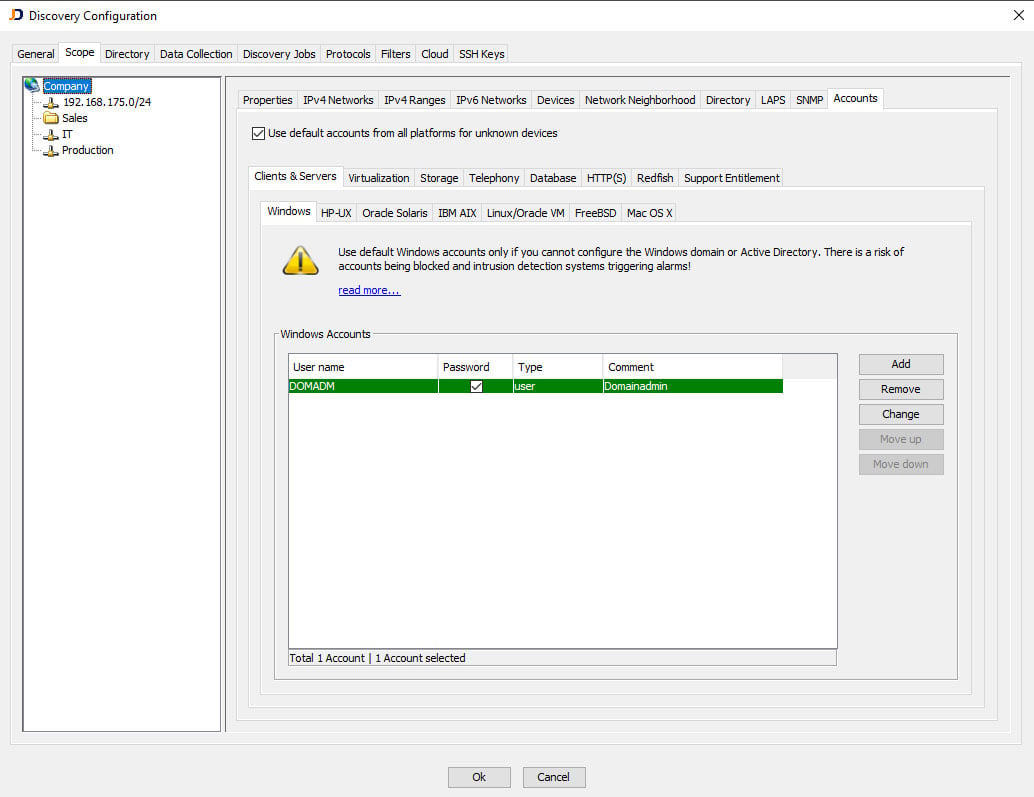
By storing the access data, JDisc will log on directly to the systems and automatically retrieve all the required information. The data received is stored in a database. From there, the JDisc interface already integrated in i-doit allows the data to be imported into the IT documentation.
Advantages of using JDisc with the interface to i-doit
Automation and time savings
The integration of JDisc with i-doit enables the system information in the CMDB to be updated automatically. This saves manual intervention and time that you would otherwise spend on regularly updating the data.
Accuracy and consistency
By automatically capturing system information and transferring it to i-doit, the accuracy and consistency of CMDB data is improved. It reduces the likelihood of errors that often occur with manual entries.
Better transparency
With the combination of JDisc and i-doit, you have greater transparency over your IT infrastructure. You can more easily track which servers are present, which services they provide, how they are connected and which software is installed on them.
Efficient resource management
The detailed information allows you to manage resources more efficiently. You can plan more precisely when and how server systems need to be upgraded or replaced.
Troubleshooting and security
The information from JDisc and i-doit enables early detection of bottlenecks, security vulnerabilities or non-compliant configurations. This facilitates troubleshooting and contributes to the security of the IT infrastructure.
ISMS risk analysis
An "ISMS" is the abbreviation for"Information Security Management System". It is a systematic framework used in organizations to ensure the security of information. The purpose of the ISMS is to identify, assess, control and minimize risks in the management of information. It aims to protect the confidentiality, integrity and availability of information and thus ensure overall information security.
Server systems are an important aspect of security management. Sensitive data that requires special protection is often stored on these systems. Other systems provide services that are essential for the operation of a company. This is why server documentation is an important part of an ISMS. It makes it possible to appropriately document configurations, security measures and processes in connection with the servers. This includes aspects such as access rights, authentication methods, encryption, firewall settings, security patches, logging and much more.
Server documentation as part of the ISMS helps to identify security risks and take appropriate protective measures to protect the servers from threats. It also facilitates the review and management of security measures, thus ensuring continuous and effective protection of information.
Implement ISMS in i-doit
As a CMDB, i-doit offers the ideal prerequisites for setting up an ISMS. With the inexpensive i-doit ISMS add-on, you can carry out the risk analysis and assessment directly in the CMDB database. To do this, you define various threat scenarios and vulnerabilities for each asset. In this example, we start by identifying the first risks for a server system.
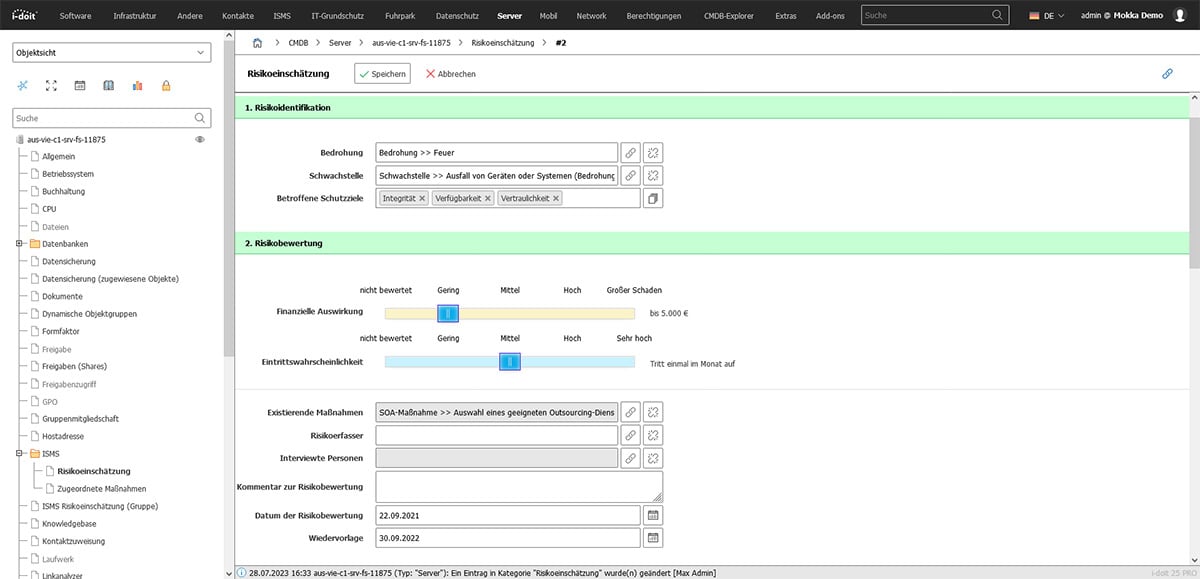
The risks are then evaluated in terms of their potential damage.
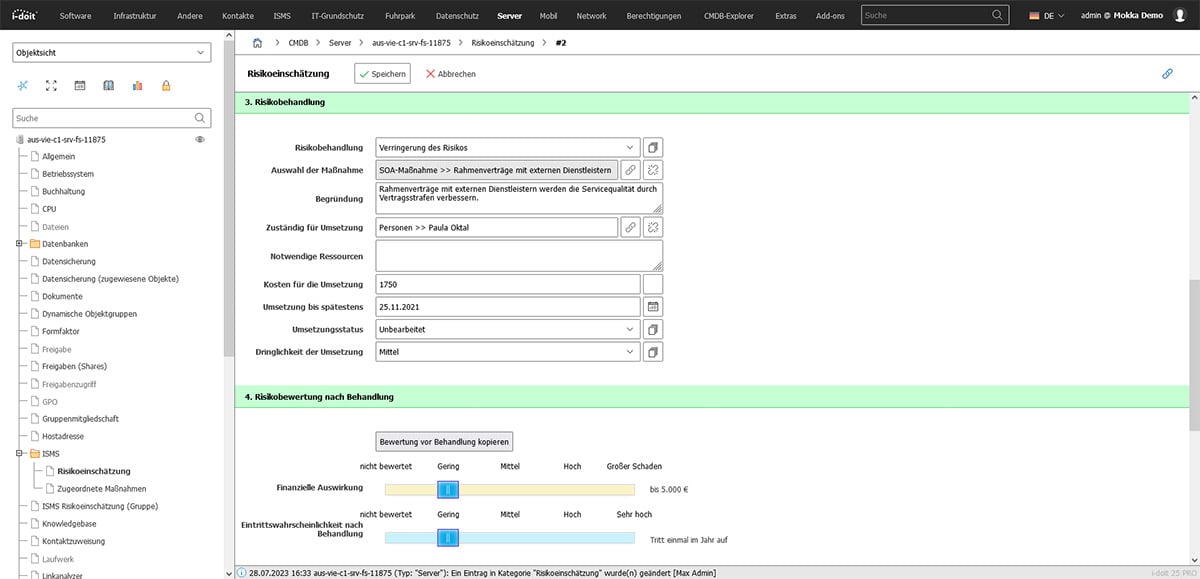
Existing measures are then linked ("What has already been implemented?") and new measures are planned which, for example, reduce the probability of occurrence or limit the damage.
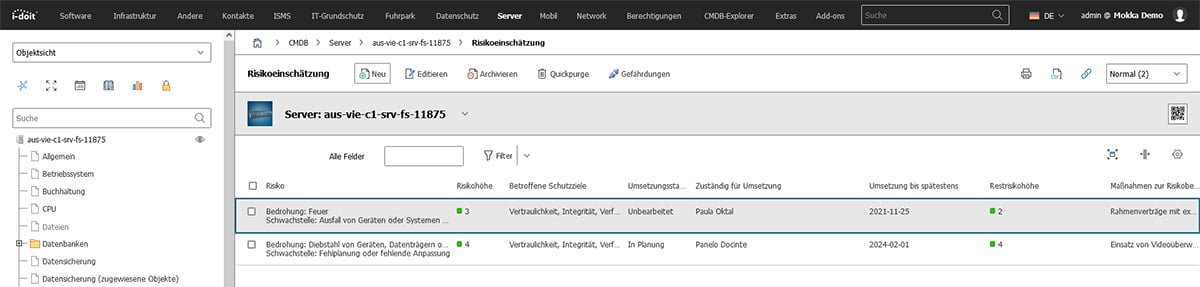
A responsible person is usually also entered for each measure and a target date is set for the implementation of the measure.
Automate server documentation with i-doit
i-doit offers a range of interfaces and integrations to automate server documentation and enable seamless communication with other IT systems.
Some examples:
JSON/RPC API
With the JSON-RPC API, external systems access the data in the CMDB and read, change, archive or delete it. The API also enables asset data to be created, retrieved or updated. This enables the integration of i-doit into other systems or the automation of certain tasks.
LDAP/Active Directory Integration
i-doit can be integrated with the Lightweight Directory Access Protocol (LDAP) and Microsoft Active Directory. This enables the automated synchronization of user accounts, computers and groups.
JDisc Discovery
i-doit can be integrated with the discovery software JDisc. The solution scans networks and inventories hardware and software information. This facilitates the automatic documentation of IT assets.
Nagios
Nagios is a popular open source software for IT monitoring. i-doit can be integrated with Nagios to import monitoring data. The IT documentation is thus supplemented with real-time data. You can see the status of important server systems at any time on the i-doit dashboard.
Checkmk
i-doit can be seamlessly connected to Checkmk. Checkmk is an advanced open source solution for IT infrastructure monitoring. This integration provides information on the status and performance of servers in real time. The data is automatically transferred to the documentation. This not only improves the timeliness and accuracy of server documentation. IT staff are also freed from (manual) tasks. This enables faster troubleshooting and ensures that server documentation is always up-to-date and complete.
Integration of openITCOCKPIT
openITCOCKPIT is a solution for monitoring and managing the IT infrastructure. This tool can collect and monitor a wide range of information. This includes system statuses, performance data and logs, which are then automatically added to the CMDB. By bringing these two systems together in a unified view, server documentation is simplified and efficiency is increased. This gives IT departments a comprehensive picture of the infrastructure. Furthermore, precise and up-to-date data is available, which facilitates troubleshooting and management. The automatic updating of documentation means that the IT department is relieved of routine tasks. More time is available for strategic planning and improving the systems.
openCelium
openCelium is a powerful middleware for automating and orchestrating data flows between different tools and services. By seamlessly transferring data between i-doit and other services such as monitoring, ticketing or cloud management systems, you can achieve an even higher level of automation. This significantly improves the quality of server documentation and avoids errors that occur during manual data entry. openCelium offers the possibility to create complex workflows based on specific events or conditions. This enables proactive maintenance and troubleshooting, for example. Downtime is minimized and overall operational efficiency is improved. With the integration of openCelium, the IT department can further optimize the server documentation process while creating significant added value for the entire organization.
SNAG-View
i-doit supports integration with SNAG-View, a powerful network monitoring solution. The combination of i-doit and SNAG-View gives you an overview of the entire lifecycle of your IT resources. SNAG-View provides important data such as status information, performance metrics and alarms in real time. This information is then documented directly in i-doit. This seamless integration gives you consistent and accurate server documentation that covers both the configuration details and operational aspects of the IT infrastructure. It also helps you to identify network problems and find quick and effective solutions. Using SNAG-View together with i-doit leads to higher efficiency, greater fault tolerance and increased availability of IT resources.
monitos
monitos is a powerful IT monitoring tool that enables real-time monitoring and alerting for a wide range of IT resources. With the integration of monitos into i-doit, critical system information and performance data is included in the server documentation. This information is used to make informed decisions about upgrades, maintenance and troubleshooting. By automating this process, you save valuable time and resources that would otherwise be required for manual monitoring and documentation. In addition, the integration of monitos shortens the response time to problems and reduces the risk of downtime and service interruptions. monitos provides a complete picture of system performance and enables proactive measures to optimize the IT infrastructure.
CSV and JSON imports/exports
i-doit offers the option of importing and exporting data in CSV and JSON format. This enables data exchange with a wide range of applications.
These interfaces help i-doit to provide comprehensive and automated documentation for all servers. They allow close integration with existing systems and processes and ensure a consistent and up-to-date data basis.
.webp?width=300&name=multi-ethnic-colleagues-working-together-at-data-c-2025-03-15-19-35-44-utc%20(1).webp)